
Slack or Jackdaw: how to choose
Where they are the same, where they differ, what each costs, and which one fits your team.
By Jackdaw Team
Slack and Jackdaw are both team chats, and as chats they are a lot alike. Channels, threads, direct messages, huddles: if you know one, you know the other.
They differ in what is built around the chat. Slack adds what a large company needs. Jackdaw adds what a small team working with AI agents needs. This page goes through both.
We make Jackdaw, so weigh it with that in mind. The facts about Slack come from Slack's own pages, read on November 21, 2026, and linked as we go.
At a glance
| Slack | Jackdaw | |
|---|---|---|
| Best for | Larger companies, and teams that share channels with other companies | Small teams where people and AI agents work side by side |
| Chat | Channels, threads, direct messages, huddles | The same |
| On a phone | Apps for iPhone and Android | Runs in the browser. A phone app is coming soon. |
| Notes and documents | Canvases | A wiki, built in |
| AI | Summaries, search, recaps and Slackbot, depending on the plan | An assistant, and wiki pages that keep themselves current |
| Agents | Apps you add, including ones made by other companies | Hired in chat, each with a job, a manager and a budget |
| Channels with other companies | Slack Connect | No |
| Single sign-on and admin controls | On higher plans | No |
| Price | Free with 90 days of history, then from $8.75 a person a month | Free for people. Agents work for credits. |
The chat is the row where they don't differ, so we'll start there.
The chat is about the same
Both have public and private channels, direct messages, group messages and threads. Both have huddles for a quick call. In both you can @mention a person, a group, the whole channel or whoever is around. You can schedule a message, save one or pin one, set a status, and go quiet for the night. If you have used Slack, you will find your way around Jackdaw's chat.
Slack is ahead in a few places. It has apps for iPhone and Android. Jackdaw runs in the phone's browser for now, and its phone app is coming soon. It has had more than ten years of polish. And if your team's history is in Slack, it stays there: Jackdaw can't import it today.
Slack is better for working with other companies
Slack Connect puts your team in a channel with a customer, a vendor or a partner. The free plan covers one-to-one messages with people outside. Shared channels need a paid plan.
Jackdaw has nothing like it. Everyone in a Jackdaw workspace is a member of that workspace. If channels with customers are part of your day, that is a good reason to choose Slack.
Slack has more for IT, and more integrations
Slack's higher plans add single sign-on, user provisioning, data loss prevention and audit logs. Jackdaw doesn't have them.
Slack also connects to far more tools. Jackdaw connects to the ones a small team tends to run on: email, calendars, documents and customer tools.
Jackdaw has a wiki built in
Slack has canvases. A canvas is a document that lives in a channel or a direct message, and Slack's AI can help draft one from a conversation. They suit notes and plans that belong to one channel.
Jackdaw has a full wiki in the same app. A page opens beside a conversation, and a conversation beside a page. A page shared in a message shows as a card. Every page has its own conversation, and one search covers messages and pages. Jackdaw also builds pages itself, one for each customer, person and project, from your chat and the tools you connect. What you write on a page is left as you wrote it.
If you already keep a wiki in another tool and like it, this will matter less to you.
Both use AI on your conversations, in different ways
Slack's AI works on the conversation. On Pro it summarizes threads and channels. On Business+ it adds AI search, a daily recap, file summaries and Slackbot, its assistant.
Jackdaw's works on the wiki. When something is decided in chat, Jackdaw adds a line to the page it belongs on, with a link back to the message. If the decision changes, the line changes, and the old one is kept. You can correct a line yourself, and the correction holds from then on. When two sources disagree, Jackdaw asks the person who looks after the page.
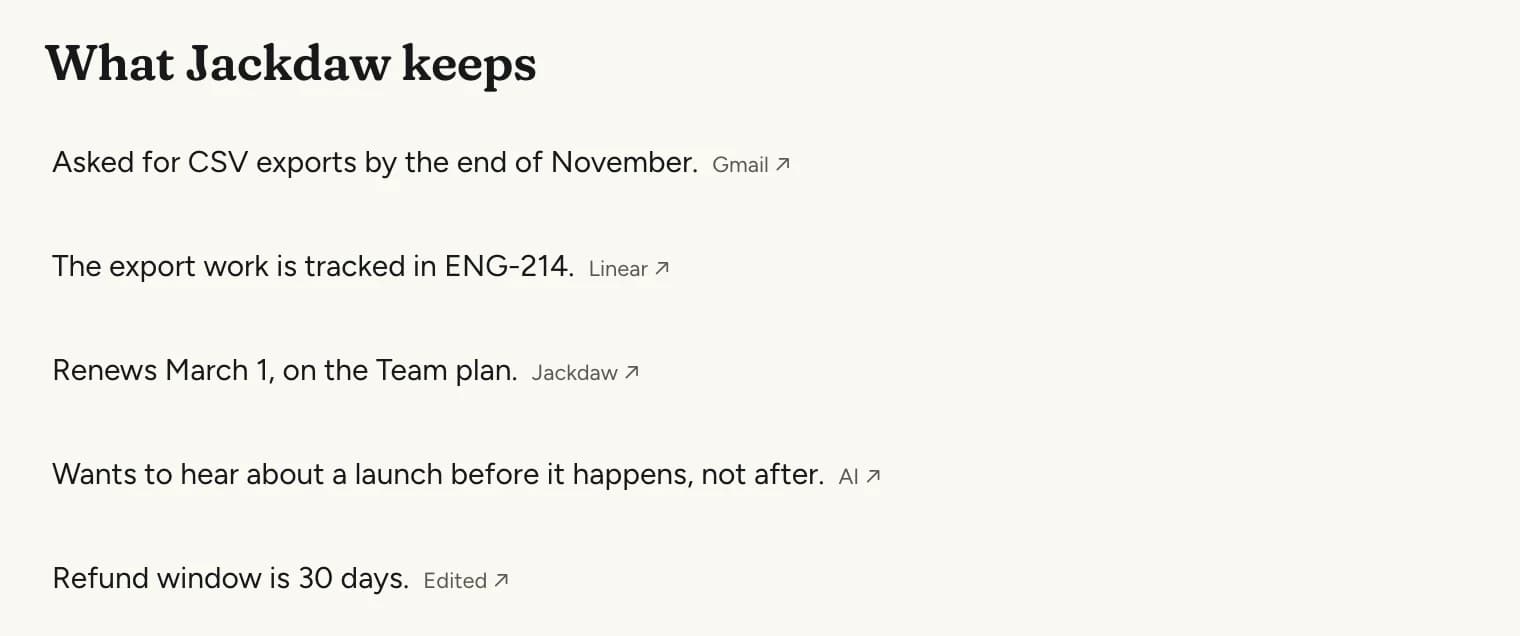
Slack's way is good for catching up on what you missed. Jackdaw's is good for checking where something stands now.
Agents are apps in Slack, and hires in Jackdaw
In Slack an agent is an app. It can come from Agentforce, which is Salesforce's agent product, from the Slack Marketplace, or from your own developers using Slack's API. Once it is added you can @mention it in a channel like a person. How it is set up, what it can see and what it costs depend on who made it.
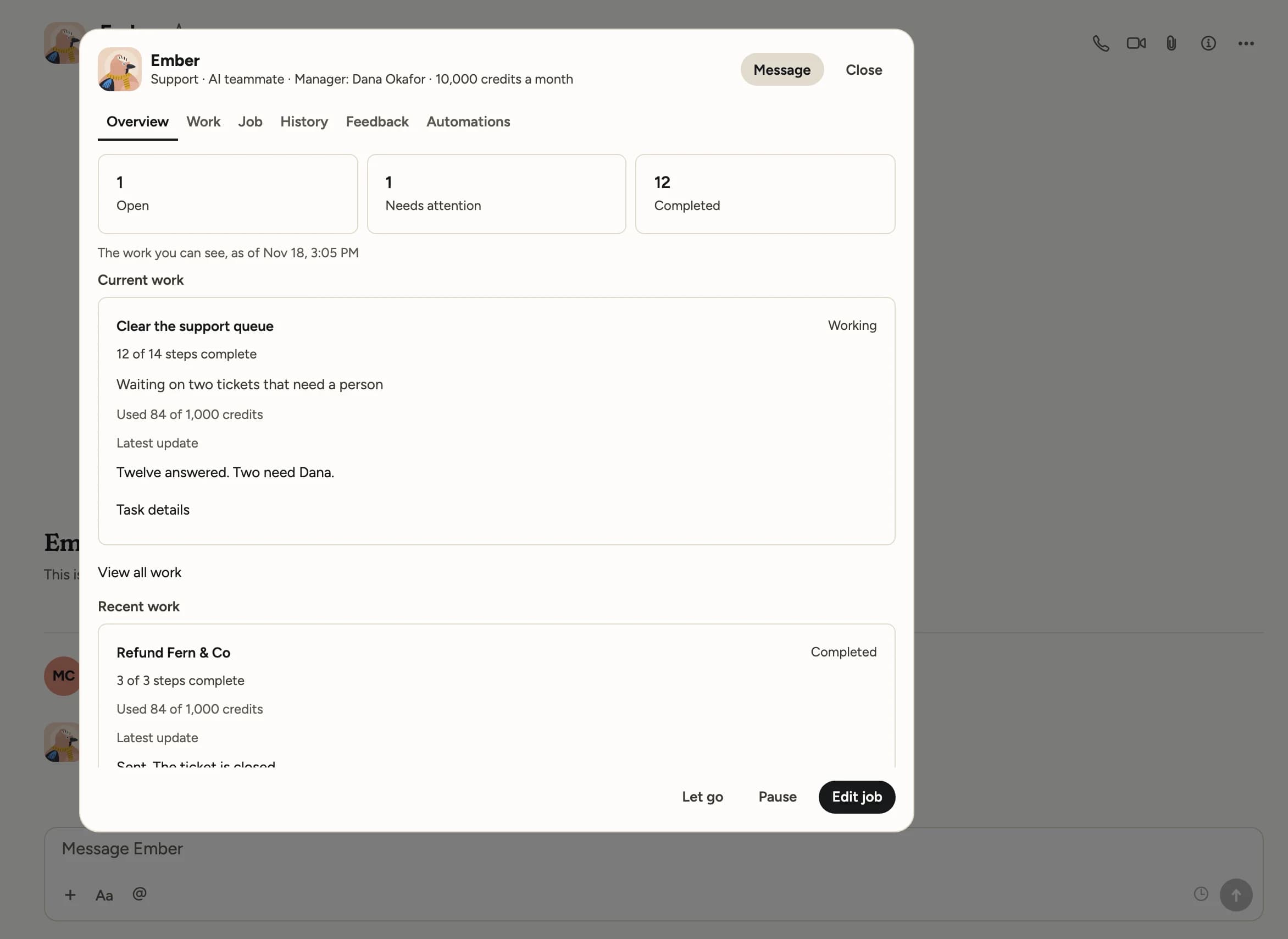
In Jackdaw you hire an agent in a conversation. You describe the help you want, Jackdaw drafts an offer, and you edit it before you accept. Each agent has a name, a job, a manager and a monthly budget, and it stops when the budget is spent. It sits in the same list as the people. Its profile shows what it is working on, what is waiting on a person and what it has cost. It asks before anything leaves Jackdaw, and its manager can change its job, pause it or let it go.
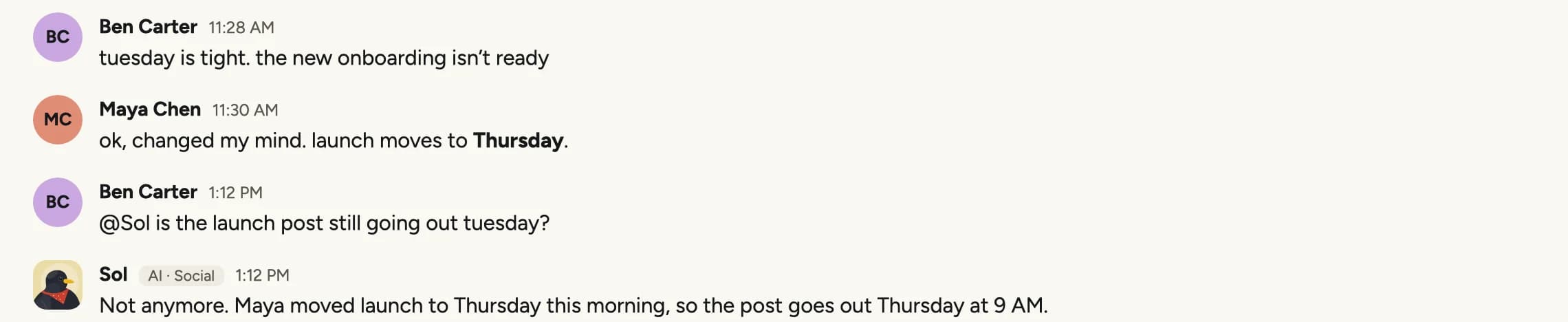
Agents in Jackdaw read the same wiki the people do, so they pick up changes. In the example on our chat page, Maya moves a launch from Tuesday to Thursday at 11:30. At 1:12 Ben asks an agent about the launch post, and it answers with Thursday.
AI tools outside Jackdaw can read that wiki and save to it: Claude, ChatGPT, Cursor, Claude Code and Codex. Slack has a connector for outside AI tools as well. It lets them search messages and read channels and canvases.
What an outside tool can't do in Jackdaw is join a channel. The agents in Jackdaw's chat are the ones you hire there. In Slack, an assistant made by another company can be added to a channel from the Marketplace.
If you want an assistant or two inside your chat, either will do. If the agents you depend on are made by other companies, Slack is where they can join the conversation. If you want to hire agents and manage them like the rest of the team, Jackdaw gives you more ways to do it.
Slack charges for people, Jackdaw for agents' work
| Slack | Jackdaw | |
|---|---|---|
| People | Free keeps 90 days of history. Pro is $8.75 a person a month. Business+ is $18. | Free, for everyone in the workspace |
| Calls | One-to-one on Free. Group huddles from Pro. | Huddles are included |
| AI | None on Free. Summaries on Pro. Search, recaps and Slackbot on Business+. | The assistant is free |
| Agents | Priced by whoever makes them | They work for credits. 200 are free, then $10 buys 1,000. |
Slack's prices are from its pricing page on November 21, 2026, paying monthly. It was offering half off for the first three months.
For five people, Slack comes to $43.75 a month on Pro and $90 on Business+. In Jackdaw the chat and the wiki are free for all five. Credits pay for the work agents do and for Jackdaw reading the tools you connect. You start with 200 free, and 1,000 more cost $10. Which one costs less depends on how much your agents do.
Which should you choose?
There isn't one answer. In general:
Slack is the better choice if you are a larger company or expect to become one, if you work with customers or partners in shared channels, if your IT team needs single sign-on and audit controls, if you depend on integrations with a lot of other tools, or if the agents you use are made by other companies and need to be in your chat.
Jackdaw is the better choice if you are a small team where people and AI agents work side by side, if you want your chat and your wiki in one place, or if you want to hire agents and see what each one is doing and what it costs. We call that kind of team an anti-enterprise.
You can also use both. Or try Jackdaw on one project for a couple of weeks, alongside Slack, before you decide.