
Notion or Jackdaw: how to choose
Where they are the same, where they differ, what each costs, and which one fits your team.
By Jackdaw Team
Notion and Jackdaw both give a team one place to keep what it knows. Both have pages, tables of pages, boards and calendars, with comments and a history you can go back through.
They differ in what is built around the pages. Notion gives you more to build with, and more for a large company. Jackdaw has a chat in the same app, and pages that keep some of their own facts current.
We make Jackdaw, so weigh it with that in mind. The facts about Notion come from Notion's own pages, read on November 21, 2026, and linked as we go.
At a glance
| Notion | Jackdaw | |
|---|---|---|
| Best for | Teams of any size that want to build their own documents, databases and sites | Small teams where people and AI agents work side by side |
| Pages and tables | Pages, databases, boards, calendars, charts, forms | Pages, collections, boards, calendars |
| Who keeps a page current | The people who wrote it, with AI when they ask | People write. Jackdaw keeps a set of facts under the page, each with its source. |
| Chat | Comments on pages | Channels, threads, direct messages, huddles |
| AI | Notion Agent and Custom Agents, on the Business plan | An assistant, and agents you hire, each with a job, a manager and a budget |
| Publishing | Sites and forms | No |
| Single sign-on and admin controls | On Business and Enterprise | No |
| Price | Free for one person, then $10 or $20 a seat a month | Free for people. Agents work for credits. |
The first two rows after "Best for" are where most of the difference is, so we'll take those first.
As a place to write, they are close, and Notion has more
In both you write pages with headings, checklists and tables, comment on them, and go back through their history. Both have tables of pages you can filter and sort. Notion calls them databases, and Jackdaw calls them collections. Both show them as boards and calendars.
Notion has more to build with. Its plans list charts, forms, database automations, published sites, an API and pages you can use offline. Jackdaw's wiki is simpler, and it doesn't publish sites or forms. If you want to build your own tools out of pages and databases, Notion is the better choice.
Jackdaw fills pages in from your work
In Notion a page says what somebody wrote on it. Notion's AI can draft, summarize and fill in database fields, and on the Business plan it takes meeting notes.
In Jackdaw people write pages the same way, and what they write is left as they wrote it. Under that, Jackdaw keeps a short set of facts it has gathered from your chat and the tools you connect. It builds a page for each customer, person and project. Every line says where it came from, and pressing it opens the original.
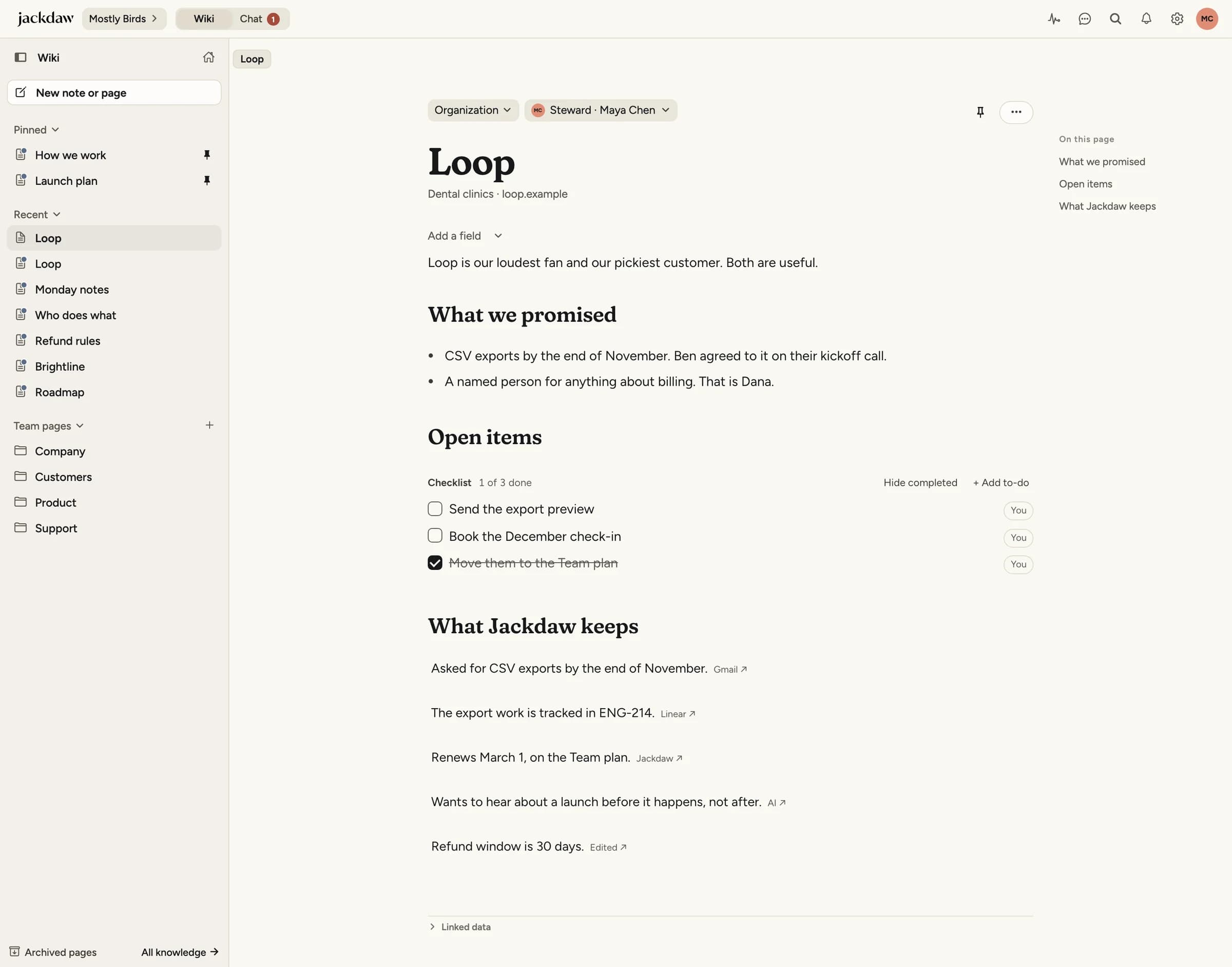
When something changes, the line changes and the old one is kept. You can correct a line yourself, and the correction holds from then on. When two sources disagree, Jackdaw asks the person who looks after the page.
If your pages are mostly documents people write once, this will matter less to you. If they are meant to say where things stand, it will matter more.
Jackdaw has a chat. Notion has comments.
Notion has comments and mentions on its pages, and its AI can search Slack. It doesn't have channels or direct messages of its own.
Jackdaw has a full chat in the same app: channels, threads, direct messages and huddles. A page opens beside a conversation, and a conversation beside a page. A page shared in a message shows as a card, every page has its own conversation, and one search covers both.
If you are happy with the chat you already use beside Notion, this is not a reason to move.
Both have AI agents, set up differently
Notion's Business plan includes Notion Agent, which can do for you what you can do in Notion yourself, and Custom Agents, which you set up one time for work that repeats. Each seat gets a monthly allowance of AI credits, and admins can buy more. Notion's AI can also search other apps, such as Slack, Google Drive and GitHub.
In Jackdaw you hire an agent in a conversation. You describe the help you want, Jackdaw drafts an offer, and you edit it before you accept. Each agent has a name, a job, a manager and a monthly budget, and it stops when the budget is spent. It sits in the chat's list beside the people, and you message it there. Its profile shows what it is working on, what is waiting on a person and what it has cost. It asks before anything leaves Jackdaw.
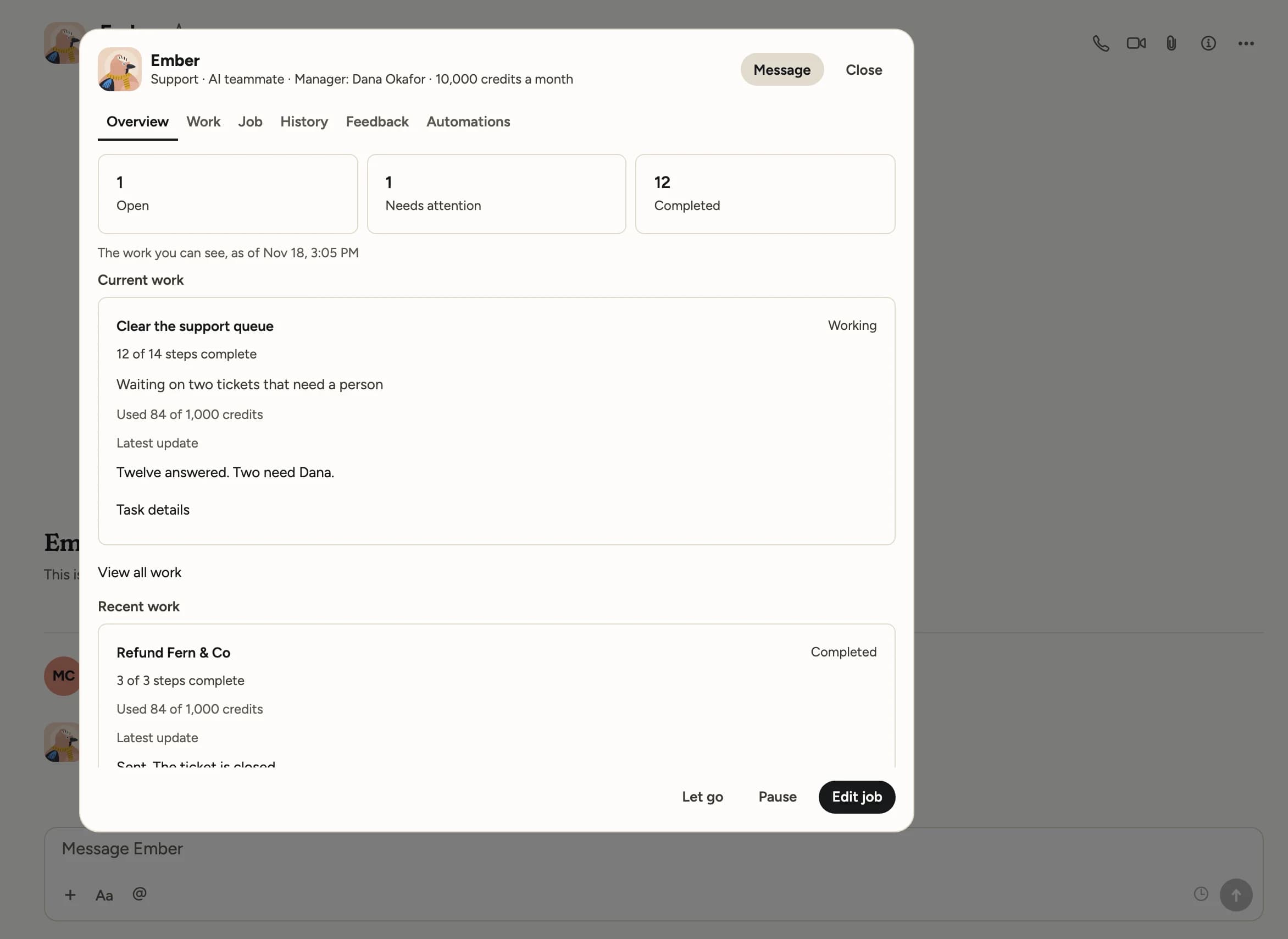
Notion's agents work on your Notion workspace and the apps it searches. Jackdaw's work in the chat, alongside the team.
Notion has more for a large company
Notion's Business plan adds single sign-on and finer permissions on databases. Enterprise adds user provisioning, an audit log and connections to security tools. Jackdaw doesn't have these.
Notion charges for seats, Jackdaw for agents' work
| Notion | Jackdaw | |
|---|---|---|
| People | Free for one person. Plus is $10 a seat a month. Business is $20. | Free, for everyone in the workspace |
| AI | A trial on Free and Plus. Included on Business, with a monthly allowance. | The assistant is free |
| Agents | Included on Business. Extra use is paid for in credits. | They work for credits. 200 are free, then $10 buys 1,000. |
Notion's prices are from its pricing page on November 21, 2026, paying monthly.
For five people, Notion comes to $50 a month on Plus and $100 on Business. In Jackdaw the wiki and the chat are free for all five. Credits pay for the work agents do and for Jackdaw reading the tools you connect. You start with 200 free, and 1,000 more cost $10. Which one costs less depends on how much your agents do.
Which should you choose?
There isn't one answer. In general:
Notion is the better choice if you want to build your own documents, databases, forms and sites, if you are a larger company that needs single sign-on and an audit log, or if your team already has years of pages in Notion and a chat it likes.
Jackdaw is the better choice if you are a small team where people and AI agents work side by side, if you want your wiki and your chat in one place, or if you want each fact on a page to show where it came from. We call that kind of team an anti-enterprise.
You can also try Jackdaw on one project for a couple of weeks before you decide. Importing your notes from another tool is free.