
Microsoft Teams or Jackdaw: how to choose
Where they are the same, where they differ, what each costs, and which one fits your team.
By Jackdaw Team
Microsoft Teams and Jackdaw are both places for a team to talk. Both have channels, direct messages and calls.
They differ in what is built around the chat. Teams is part of Microsoft 365, so it comes with meetings, email, Office documents and the controls a large company needs. Jackdaw adds what a small team working with AI agents needs: a wiki joined to the chat, and agents you hire and manage like teammates.
We make Jackdaw, so weigh it with that in mind. The facts about Teams come from Microsoft's own pages, read on November 21, 2026, and linked as we go.
At a glance
| Microsoft Teams | Jackdaw | |
|---|---|---|
| Best for | Companies that run on Microsoft 365, and teams whose day is meetings | Small teams where people and AI agents work side by side |
| Chat | Channels, chats and calls | Channels, threads, direct messages, huddles |
| Meetings | Up to 300 people, with recordings, transcripts and webinars | Huddles, for a quick call |
| On a phone | Phone apps | Runs in the browser. A phone app is coming soon. |
| Notes and documents | Word, Excel, OneNote and Loop | A wiki, built in |
| AI | Copilot, on the plans that include it | An assistant, and wiki pages that keep themselves current |
| Agents | One for meetings, one for each channel, and ones your company builds | Hired in chat, each with a job, a manager and a budget |
| People outside your company | Guests and shared channels | No |
| Price | From $4 a person a month, paid yearly | Free for people. Agents work for credits. |
The chat is where they are closest, so we'll start there.
The chat is close
Both have channels, private channels, direct messages and group messages. In both you can @mention people, share files and start a call from the conversation. In Teams, channels sit inside teams. Jackdaw has one list of channels.
Teams has apps for phones, the web and the desktop. Jackdaw runs in the browser and on the Mac, and its phone app is coming soon.
Teams is better for meetings
Meetings are what Teams is best at. Its business plans hold up to 300 people in a meeting for up to 30 hours, with recordings, transcripts, live captions and breakout rooms. Microsoft 365 Business Standard adds webinars with registration.
Jackdaw has huddles, which are for a quick call with the people you work with. It doesn't run webinars or large scheduled meetings. If your day is meetings, and many of them are with people outside your team, Teams is the better choice.
Teams fits a company that runs on Microsoft 365
Most Teams plans are Microsoft 365 plans. They come with business email, Word, Excel, PowerPoint, OneDrive and SharePoint, and Teams works with all of them. If your company already pays for Microsoft 365, you already have Teams.
Jackdaw is a product by itself. It connects to the tools a small team tends to run on: email, calendars, documents and customer tools.
Teams has more for IT, and for working with other companies
Teams signs people in through Microsoft's identity service, and its business plans cover up to 300 people, with enterprise plans beyond that. It has guest access, and shared channels that people in another organization can join.
Jackdaw doesn't have single sign-on, guests or shared channels. Everyone in a Jackdaw workspace is a member of that workspace.
Jackdaw has a wiki built in
In Microsoft 365, notes and documents live in other apps: Word, OneNote and Loop.
Jackdaw has a full wiki in the same app as the chat. A page opens beside a conversation, and a conversation beside a page. A page shared in a message shows as a card. Every page has its own conversation, and one search covers messages and pages. Jackdaw also builds pages itself, one for each customer, person and project, from your chat and the tools you connect. What you write on a page is left as you wrote it.
If your team already keeps its notes in OneNote or Loop and likes them, this will matter less to you.
Both use AI on your conversations, in different ways
Microsoft's AI is Copilot. It is in Teams on Microsoft 365 Business Standard with Copilot, or as an add-on to other plans. In meetings, an agent called Facilitator takes notes as the meeting goes, follows the agenda, and sums up the decisions and open questions.
Jackdaw's AI works on the wiki. When something is decided in chat, Jackdaw adds a line to the page it belongs on, with a link back to the message. If the decision changes, the line changes, and the old one is kept. You can correct a line yourself, and the correction holds from then on. When two sources disagree, Jackdaw asks the person who looks after the page.
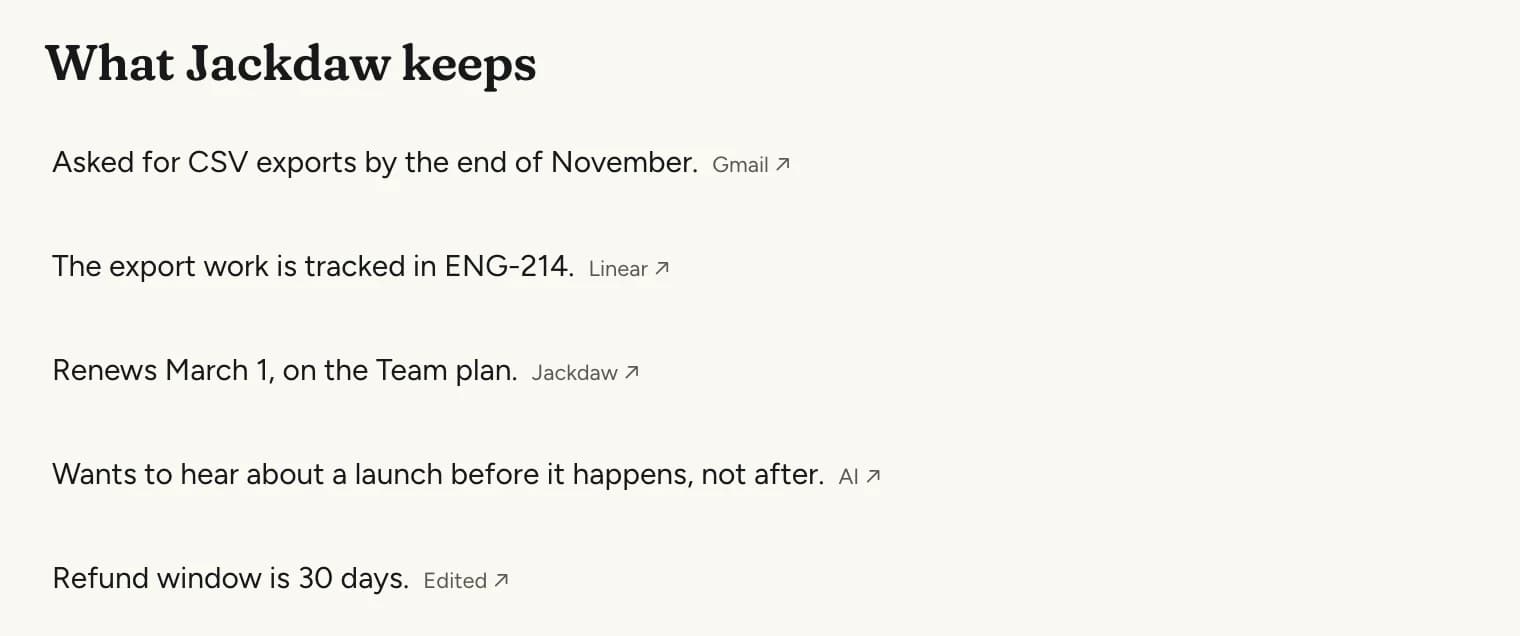
Microsoft's is strongest in a meeting and just after one. Jackdaw's is for checking where something stands now.
Agents come with a channel in Teams, and are hired in Jackdaw
Teams has an agent for each channel, called Channel Agent, which Microsoft lists as a public preview. It takes the channel's name. It drafts status reports, schedules meetings, manages tasks and answers questions, and you @mention it like a person. A channel has one. A company can also build its own agents and add them to Teams.
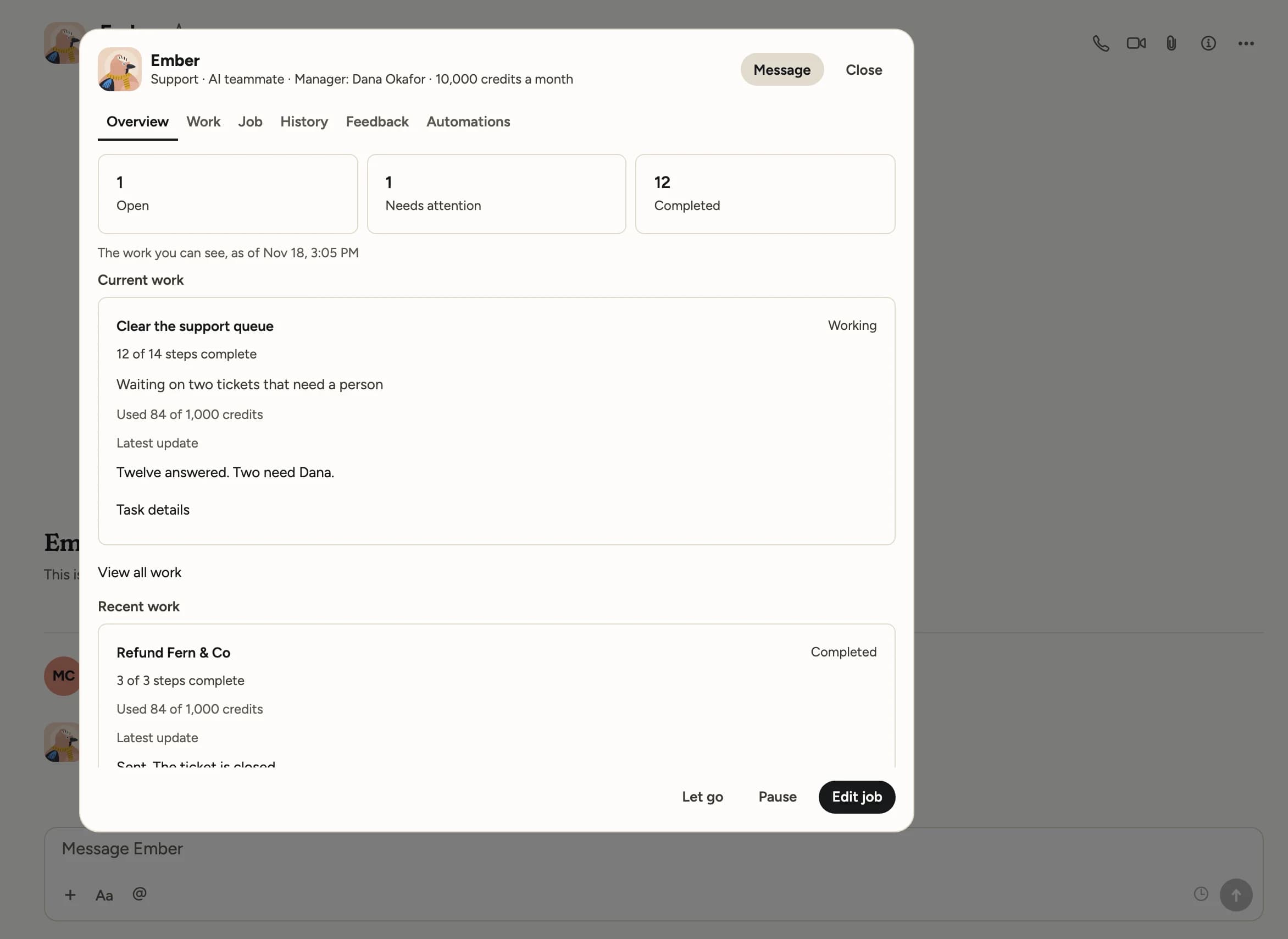
In Jackdaw you hire an agent in a conversation. You describe the help you want, Jackdaw drafts an offer, and you edit it before you accept. Each agent has a name, a job, a manager and a monthly budget, and it stops when the budget is spent. It sits in the same list as the people and can work in more than one channel. Its profile shows what it is working on, what is waiting on a person and what it has cost. It asks before anything leaves Jackdaw, and its manager can change its job, pause it or let it go.
AI tools outside Jackdaw can read its wiki and save to it: Claude, ChatGPT, Cursor, Claude Code and Codex. They can't join a channel. The agents in Jackdaw's chat are the ones you hire there.
If you want help running a channel and its meetings, Teams has that built in. If agents do a lot of your team's work, Jackdaw gives you more ways to manage them.
Teams charges for people, Jackdaw for agents' work
| Microsoft Teams | Jackdaw | |
|---|---|---|
| People | Teams Essentials is $4 a person a month. Microsoft 365 Business Basic is $7. | Free, for everyone in the workspace |
| Calls | Meetings on every plan. Webinars on Business Standard. | Huddles are included |
| AI | Microsoft 365 Business Standard with Copilot is $23.50. Copilot as an add-on is $18. | The assistant is free |
| Agents | Varies by plan | They work for credits. 200 are free, then $10 buys 1,000. |
Microsoft's prices are from its pricing page on November 21, 2026, for each person each month, paid yearly.
For five people, Teams comes to $20 a month on Essentials, $35 on Business Basic and $117.50 on Business Standard with Copilot. In Jackdaw the chat and the wiki are free for all five. Credits pay for the work agents do and for Jackdaw reading the tools you connect. You start with 200 free, and 1,000 more cost $10. Which one costs less depends on how much your agents do.
Which should you choose?
There isn't one answer. In general:
Teams is the better choice if your company runs on Microsoft 365, if your work is mostly meetings, if you work with people in other organizations in guest or shared channels, or if you are a larger company whose IT team needs Microsoft's sign-in and controls.
Jackdaw is the better choice if you are a small team where people and AI agents work side by side, if you want your chat and your wiki in one place, or if you want to hire agents and see what each one is doing and what it costs. We call that kind of team an anti-enterprise.
You can also try Jackdaw on one project for a couple of weeks, alongside Teams, before you decide.